
CCF Portal User Guide for Applicants
Submission of Requests to the Commission for the Control of INTERPOL’s Files (CCF)
Notice
This document does not constitute legal advice or a legal opinion and is provided without prejudice to any position that may be taken by the CCF on the related matters. It aims to assist Applicants in the preparation and submission of their requests. The information provided in these guidelines may change at any time without prior notice.
This document will be updated on a regular basis, as the CCF identifies pertinent additional guidance further to the launch of the CCF Portal.
Users are encouraged to check this page regularly to ensure they are consulting the most recent version.
Latest update: March 2026
Prepared by:
Commission for the Control of INTERPOL’s Files (CCF)
200 Quai Charles de Gaulle
69006 Lyon
France
1. Introduction
1.1. Preliminary comments
This CCF Portal User Guide (the ‘Guide’) provides guidance on how to use the CCF Portal (“the Portal”), in order to submit a request to the Commission for the Control of INTERPOL’s Files (“CCF”).
Its main objective is to provide clarification on certain questions regarding the use of the Portal, which require additional explanation. It is not designed to be an exhaustive guide to each question.
Users shall also read and comply with the Terms of Use, as they set out the conditions governing access to and use of the portal, including the User’s rights, responsibilities and applicable restrictions.
Terminology: the term ‘Applicant’ refers to any person or entity that submits a request to the CCF under Article 29 or Article 42 of the CCF Statute. The request may be submitted either directly by the person or entity or via their authorized representative. The request may concern data, that could be registered in INTERPOL’s Information System (IIS), relating to the individual or entity, or their property. The ‘Submitter’ refers to the person or entity submitting a request to the CCF, whether as the Applicant or as the Applicant’s representative.
1.2. The CCF Portal
Launched in March 2026, the Portal is the CCF’s secure online platform used by Applicants or their authorized representatives to create and manage user accounts, submit requests and supporting documents, and communicate with the CCF.
All communications and supporting documents exchanged between Submitters and the CCF are securely stored and exclusively accessible through the Portal. Therefore, and unless otherwise requested by the CCF in exceptional circumstances, no original paper versions of the documents are required. Indeed, the CCF will not take into consideration any information or documents sent by e-mail or postal mail, unless the CCF has found exceptional circumstances requiring the use of other means, as provided for in Rule 25(2) of the CCF Operating Rules.
Submitters can also see the status of their request(s) in their Portal account.
2. Structure of the Portal
The Portal has been carefully designed to ensure that certain fields, those marked with an asterisk (*), are mandatory. This will help ensure that requests meet the minimum admissibility requirements.
Dropdown menus are deployed for certain questions, to help structure the request; however, there is always an ‘Other’ option at the end of each dropdown list, in which Submitters can specify an additional option. In such cases, a mandatory ‘Please specify’ field will appear, and additional information needs to be provided.
This icon, found on the top right-hand side of each page, enables the user to log out, or to change the account’s password (via Profile). The other items are not activated.
3. Language
3.1. Language of the Portal
Where possible, the Portal can display pages in Arabic, English, French and Spanish. When submitting a new request, Submitters can select their preferred language from the menu at the top right-hand side of the screen.
3.2. Language of the requests
All requests and supporting documents should be in Arabic, English, French or Spanish, the working languages of INTERPOL, in accordance with Article 18(1) of the CCF’s Statute and Rule 14 of the CCF Operating Rules. Submitters shall therefore only use one of these four languages when entering information in the Portal. Furthermore, appendices in an additional language must be translated into one of these languages.
4. Sections ‘Request’ and ‘By Whom’
4.1. Type of request – ‘Request’
When entering the ‘New Request’ section of the Portal, Submitters are first asked which type of request they would like to submit. They can choose between:
- Access: a request for access to information possibly held in the INTERPOL Information System.
- Correction/Deletion: a request for correction/deletion of information possibly held in the INTERPOL Information System.
- Revision: an application for revision of a Decision of the CCF, according to Article 42 of the CCF Statute.
Only one option can be selected: should Submitters wish to submit more than one type of request (Access + Correction/Deletion, or Access + Revision), they would need to submit a separate request for each one. It is possible during the submission of a request to indicate any linked requests (see the ‘Link’ section).
Should the Applicant wish to submit a subsequent request, a full new request would need to be submitted.
4.2. The person or body submitting the request – ‘By Whom’
This section invites Submitters to clarify who is submitting the request on behalf of the Applicant. Applicants may submit requests on their own behalf, or through an authorized legal representative. Legal representatives are anyone designated by Applicants, via a power of attorney; they do not have to be a lawyer. For example, they can be a family member, a friend or an NGO/association.
This section also invites Submitters to clarify whether their request relates to data concerning an individual or an entity.
Should a Submitter wish to submit linked requests concerning more than one individual (same criminal case, parent/child, etc.), a separate request will have to be submitted for each individual. During the access and deletion/correction request process, there is a section ‘Link’ in which details concerning linked requests can be provided.
Note: in the case of a parent representing their child over 18 years of age, ‘I am the legal representative’ should be selected and not ‘I am the parent or the guardian of the Applicant’.
4.3. Further sections to complete
Based on the options selected in the sections ‘Request’ and ‘By Whom’, the Portal will determine which further sections need to be completed by the Submitter. For example, the section ‘Representative’ will disappear when Submitters indicate that they, themselves, are the Applicant.
The sections detailed hereafter in this Guide will therefore only be visible to Submitters if they are applicable to the request.
5. Section ‘Parent/Guardian’
This section is to be completed either when Applicants are represented directly by a parent or guardian, or where a parent or guardian has signed a power of attorney designating a legal representative to represent the Applicant.
5.1. Parent
This section is only for minor children, under 18 years of age. As mentioned above, if the child is an adult, ‘I am the legal representative’ should be selected in the ‘By Whom’ section.
5.2. Guardian
A legally appointed guardian can submit a request on behalf of an adult, or a minor under 18 years of age.
6. Section ‘Representative’
This section is to be completed when the Applicant is represented by a legal representative, such as a lawyer, family member, NGO, or any other person designated by the Applicant, via a power of attorney.
6.1. Initial request
Power of attorney template: using this template, Applicants may designate a main legal representative. In addition, this template allows them to designate up to two further contacts working for a particular Representative Body, such as a law firm or NGO. This enables the CCF to send messages concerning the request to up to three members of the same firm/body. Applicants may use either this template power of attorney, or their own template. The power of attorney shall be signed by the Applicant (a power of attorney signed by one lawyer, designating another, is not accepted by the CCF).
Power of attorney, expiry date: should there not be an expiry date indicated on the power of attorney, then the CCF will deem it to be valid for two years after the date that it was signed by the Applicant.
Your reference: should the representative have a file reference number for the request, it can be entered in this field. It will be quoted on all correspondence sent by the CCF.
6.2. The Applicant wishes to change representative
Should an Applicant wish to change representative during the course of the study of a request, the new representative must submit a new request via the Portal, providing a new power of attorney, signed by the Applicant. Assuming the admissibility conditions are met, the new representative will automatically become the sole point of contact with the CCF concerning the request.
The new representative should clearly state whether the CCF should consider the submission of the former representative(s), or whether their request should be considered as new submissions rescinding and replacing the former ones. Furthermore, and assuming that the admissibility criteria are met, the new representative may request that the study of the existing request be suspended, whilst the new representative prepares the full new submissions.
Should an Applicant, with an ongoing request submitted by a representative, submit a request directly to the CCF, the CCF would assume this to be an instruction that the Applicant is the sole point of contact going forward and it would duly inform the previous representative of this.
7. Section ‘Applicant’
This section is to be completed when the Applicant is an individual.
Name – original script (non-Roman) alphabet: where applicable, Submitters are invited to enter the name of the Applicant in scripts other than Roman letters, that may be written on their identity documents. If the original language’s characters are in Roman letters, then this field should be left blank. The original alphabet version will be used to increase accuracy when processing the request, by taking into account alternative transliterations.
Date of birth: whilst this should always be stated in full, as it appears in the Applicant’s identity document, very occasionally some identity documents only indicate the year of birth. In these rare situations, the Submitter shall enter 01 January of that year in this field.
Nationality: if the Applicant is currently stateless, then the ‘Other’ option in ‘Nationality 1’ should be selected and “stateless” written in the ‘Please specify’ field. Further information about the Applicant’s situation should be provided in the ‘Request Detail’ section.
Identity document: the copy of one of the Applicant’s identity documents is mandatory, although a second one can be added in this section by checking ‘Identity document 2’. This official document must bear all the necessary elements to identify the person (name, family name, date of birth and photograph, at a minimum) and not be redacted (no erasures, illegible characters, etc.). As some of this information may only show on the reverse side of the identity document, it is therefore possible to upload two files, one for each side.
If the Applicant does not have in his/her possession one of these types of identity document, the Submitter is invited to upload any other identity document/statement, with any supporting information/documents, to explain why an official identity document cannot be provided. If there is no document number, “non-applicable” should be entered in that field and further information shall be provided in the ‘Request Detail’ section later on in the form. Warning: failure to provide an appropriate identity document or explanation concerning the absence of one, will result in the request being considered not admissible.
Document number: this should be the individual document number and not, for example, the Applicant’s permanent fiscal/social security number, which in some countries may also show on the identity document.
8. Section ‘Entity’
This section is to be completed when the Applicant is an entity, for example when the entity is the owner of a vehicle/other property concerned by the request.
Certificate of incorporation for the entity: this must be supplied in all cases and, where applicable, translated into one of INTERPOL’s official languages.
Company signatory: this is a person who is officially authorized to sign documents on behalf of the company.
Document attesting the capacity of the signatory to represent the entity: an official company document shall be supplied confirming the signatory’s power to sign on behalf of the entity. This could be a document such as a Certificate of Incorporation, Company Articles or a Company Board Resolution.
9. Section ‘Data’
This section invites Submitters to confirm which type of data is the subject of the request. One, or more, of the following five options may be selected:
Nominal data: the request concerns data relating to the Applicant, as an individual/entity, about the data concerning them that may be registered in the INTERPOL’s Information System. This option is checked by default and cannot be modified.
Vehicle data: the request concerns data relating to the Applicant’s vehicle, that may be registered in INTERPOL’s Stolen Motor Vehicle database.
- The VIN number is a serial number, nearly universally accepted by the automotive industry, to uniquely identify a vehicle. The VIN can be found in the registration document of the vehicle. Current VINs consist of 17 characters and CANNOT contain the letters I, O and Q. Submitters should exercise caution when inputting the VIN, to avoid mixing up the three aforementioned letters with numbers in the VIN, such as 1 (one) and 0 (zero).
- If the Applicant does not have a government-issued document confirming that the Applicant is currently the registered owner of the vehicle, the Submitter should upload any documents that indicate that the Applicant is the owner. The situation should be explained in the Request Details section, later in the form.
Travel document: the request concerns data relating to the Applicant’s travel document, that may be registered in INTERPOL’s Stolen Lost Travel Document database.
Vessel data: the request concerns data relating to the Applicant’s vessel, that may be registered in INTERPOL’s databases.
Work of art data: the request concerns data relating to the Applicant’s work of art, that may be registered in INTERPOL’s Works of Art database.
Important note: regardless of the option(s) selected above, and as part of the careful consideration of the request, the identity details of the owner of any vehicle, travel document, vessel or work of art mentioned in the request will be checked to verify whether any data concerning the owner are being processed in the INTERPOL Information System (IIS).
10. Section ‘Request Detail’
10.1. Access request
No additional information is required for an Access request; therefore, cover letters are not required for access requests. However further information may be indicated in the structured fields provided.
In particular, prior to submitting the request, Submitters are invited to check whether any publicly available red or yellow notices are available on the INTERPOL website concerning the Applicant, and to indicate it in this section if so. It should be noted that the majority of Red Notices are restricted to law enforcement use only and are therefore not published on the INTERPOL website.
From which country/countries/entity: Submitters are invited to provide any information or documentation, that they may have, which expressly indicates that data could be registered in INTERPOL’s Information System. This may facilitate the processing of the request. In accordance with Article 35 (2) of the CCF’s Statute, the CCF shall consult any country/entity potentially concerned by the request, prior to disclosing any data that could be registered in INTERPOL’s Information System.
10.2. Correction/Deletion request
In this section, it is mandatory to outline one or more of the INTERPOL Rules allegedly violated that form(s) the legal basis of the request for correction/deletion of data.
If the Applicant has not previously made an access request, Submitters are invited to check whether any publicly available red or yellow notices are available on the INTERPOL website concerning the Applicant, and to indicate if so. It should be noted that the majority of Red Notices are restricted to law enforcement use only and are therefore not published on the INTERPOL website.
Protective status: this should be ticked if the Applicant has a status protecting him/her against refoulement to his/her country of origin (refugee or asylum seeker), as this could impact the study of the request, as per the INTERPOL Refugee Resolution available on the INTERPOL website. Should the Applicant hold an immigration status or residency permit not protecting against refoulement, this section should not be completed, as it is reserved specifically for individuals who have applied for international protection.
Arguments: Submitters shall provide a summary of arguments, not exceeding 10 pages in length, in accordance with Rule 30(8) of the CCF’s Operating Rules. Respecting this limit is essential, in order that the CCF can efficiently process requests.
This document shall include the following:
(i) A factual outline of the request.
(ii) Legal arguments, presented in an organised way and reflecting the Interpol Rules allegedly violated.
(iii) A clear summary of the request’s purpose at either the beginning or the end of the document.
Submitters may also include the following:
(i) Any additional information concerning the Applicant that might be relevant for the examination of the request, such as previous and current functions, pending legal actions, etc.
(ii) References to all appendices (where applicable, see further note below).
(iii) Further information on any linked requests before the CCF.
(iv) Restrictions: as per Article 33 of the CCF Statute, the information contained in all requests is made available to INTERPOL’s General Secretariat. Consequently, Applicants cannot request any restrictions vis-à-vis the General Secretariat. Should Applicants wish to indicate any restrictions vis-à-vis any data source, these must be clearly outlined in a dedicated section of the arguments document.
(v) Any other information relating to the request, or the submission of the request, that was not possible to communicate elsewhere in the application process.
Appendices: Submitters may upload a maximum of 20 appendices, and they shall be clearly listed and referenced in the summary of arguments document, in accordance with Rule 30(8) of the CCF’s Operating Rules. The dropdown menu in the ‘Type of document’ field can provide guidance as to the type of document that can be submitted, although this is not an exhaustive list and any document strictly relevant to the request can be attached.
Should a request reference information published on a freely accessible website, the link(s) (URLs) to the webpage(s) concerned should be provided in this document (indicating any pertinent information) in order that the CCF can access the content, but the PDF version should not be included with the Appendices. However, if the webpages/articles are behind a paywall – or require the user to be connected with an account (free or otherwise) – they should be submitted as PDF documents in the appendices (highlighting any pertinent information).
The CCF requests that the appendices – and their file names – be clearly labelled, as per the following example:
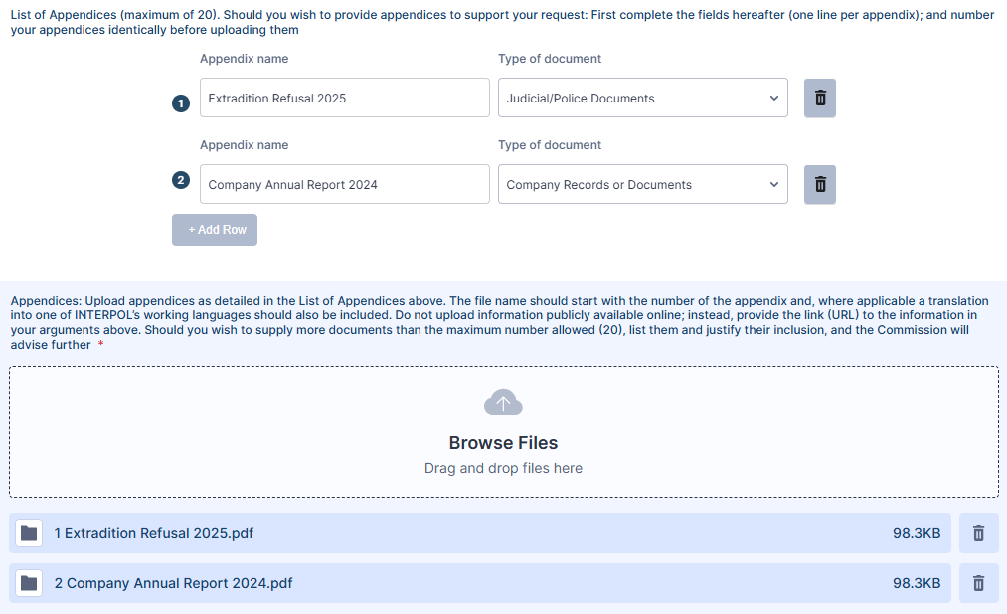
Video and audio submissions are not considered during the study of a request. The procedure before the CCF is a written one, therefore only transcripts of pertinent extracts may be taken into consideration.
10.3. Application for Revision
In this section, it is mandatory to communicate to the CCF at least one newly discovered fact which could have led the CCF Requests Chamber – the Chamber which examines and decides on requests for correction and/or deletion of data processed in the INTERPOL Information System – to a different conclusion, if known at the time at which the original correction/deletion request was being considered.
At this stage of the process, it is only possible for Submitters to attach one document: a two-page summary succinctly describing the newly discovered fact(s).
Once the CCF has undertaken an initial review of the newly discovered fact(s) provided, it may request further documents from the Submitter. At this point, but not before, Submitters can provide a summary of arguments, not exceeding 10 pages in length, in accordance with Rule 30(8) of the CCF’s Operating Rules. Respecting this limit is essential, in order that the CCF can efficiently process requests.
According to Article 42(2) of the CCF Statute, applications for revision must be made within six months after the discovery of the fact.
11. Section ‘Link’
The link section enables Submitters to link the request currently being submitted with another request. Examples of reasons why requests are linked could be:
- The linked requests relate to the same Applicant.
- The linked requests relate to the same criminal case.
- The linked requests relate to members of the same family (for example, a parent and a child).
It is possible that the Submitter wishes to submit one or more linked requests at the same time, for example a request for a parent and their child. When submitting the first request, the Submitter should indicate in this section that a further request ‘will follow’.
Should the Submitter for linked criminal case requests be different, the CCF will treat each request independently. It can only use arguments received by the Submitter for each particular request.
12. Section ‘Contact’
As outlined in the ‘Representative’ section, Submitters can use the CCF’s template power of attorney to designate up to three contacts working for a particular Representative Body, such as a law firm or NGO. Communications will always be sent to the e-mail address linked to the Portal account; however, in this section, and should the Submitter so wish, it is possible to add up to two other e-mail addresses to which communications may be copied, for the contacts mentioned in the power of attorney.
Submitters should ensure that there are no restrictions preventing senders to send messages to the provided e-mail address. For example, e-mail addresses using the PEC (Posta Elettronica Certificata) system are not designed for international usage and the CCF cannot send messages to such e-mail addresses.
13. Section ‘Validation’
This section is the final step of the process and once the ‘Submit’ button is selected the request will be delivered to the CCF and can no longer be modified by the Submitter. By completing this ‘Validation’ section and submitting the request, the CCF considers that the Submitter has duly signed their request.
14. Saving a Draft Request
Submitters may wish to save their requests as a draft during the request creation process, either whilst awaiting further documents or information, or because their internet connection is unreliable and regular saving whilst completing the form can minimise the risk of losing information entered. Each page has a ‘Save’ button, which may be used for this purpose. Once saved, the user will receive a link by e-mail, via which they can finalise the partially completed request. Alternatively, the request can be accessed when attempting to submit a completely new request, by selecting the option ‘Continue with draft’ when prompted.
During the period in which the request is in ‘draft’ status, documents provisionally uploaded to the Portal prior to submission of the request are not visible to the CCF.
Should the Submitter decide not to submit the initial draft request, from the initial menu ‘New request’ should be selected, and the option ‘Discard and start over’ should be selected.
Only one request may be saved as a draft at any given time.
15. Once the Request Is Submitted
Once the request is submitted, a confirmation message will appear both on the Portal, and in an e-mail sent to the Submitter, with a link via which the Submitter can follow their request. Furthermore, the Submitter can connect to the Portal account at any time and select ‘View all your requests’.
Whilst this initial automatic message will only be sent to the e-mail address linked to the Portal account, future messages concerning the request will copy any other addresses requested in the ‘Contact’ section.
Using the ‘Print’ button, the submission can be printed by the Submitter, or saved as a PDF.
E-mails sent to Submitters by the CCF are sent from an unmonitored ‘no reply’ e-mail address. Therefore, any replies sent to this address will not be received by the CCF. Consequently, in order to convey additional information or corrections relating to the request, when viewing the request (as detailed above), the Submitter can communicate additional information or documents to the CCF by using the ‘Send Message’ button in the top right-hand corner. Important: individual messages sent shall only refer to the request concerned, not to multiple requests.
In addition to the ‘Send Message’ feature, questions concerning the user’s account, such as requests to change the e-mail address associated with the account, can be submitted to the CCF here: https://ccf-interpol.jotform.com/app/ccf-secretariat/private/252432948749066.
